


The Times: UK & World News
3.5159.00 Reviews
App Specs
- Version
- 12.4.1
- Updated On
- License
- Free
- Downloads
- 1,000,000+
- Developer
- Times Media Limited
- Categories
- News & Magazines
- Platform
- Android, iOS
Screenshots

 Analysis by AppCompare
My first-week test of The Times: UK & World News would be less about collecting headlines and more about whether its routine feels worth keeping. A news app can be appealing on day one, then become one more stream of alerts and stories I never finish. This one is built around UK and international coverage, with the newspaper-like feel that suits readers who want a considered read rather than only a quick scan.
What makes the first few days inviting
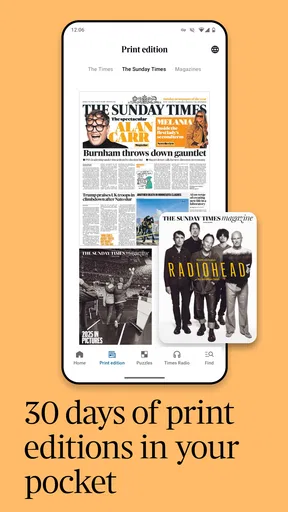
The home page gives me a clear place to begin: headlines and images are arranged for browsing, and tapping into a story is straightforward. That matters when I have only a few minutes and do not want to spend them figuring out menus. The daily edition also gives the day a natural starting point, while a separate breaking-news area offers another route when a major story is developing.
Personalizing the sections can make that first visit feel more relevant. I would put the topics I follow most near the front, but leave room for coverage outside my usual interests. A feed that is too narrowly tuned can become an echo chamber; a little variety is useful when I want the app to inform me rather than simply confirm what I already read.
Who is likely to find a routine here
I can see this working for someone who wants a regular reading habit: a morning check of the edition, a closer look at one or two stories, then a brief return later if a major event breaks. It is also a good fit for readers who like switching between formats. A video or podcast can suit a short break, while written reporting is better when I want to follow the details at my own pace.
For example, on a busy weekday I might scan the edition over breakfast, save my attention for one story that affects the day’s news, and listen to audio later rather than trying to read everything on a commute. That is a more manageable way to use a news app than treating every headline as something I must open. The value comes from choosing a few useful moments, not from spending all day refreshing.
Where it sits among news alternatives
Compared with a broad news aggregator, this app feels more like settling into one publication’s selection and presentation. An aggregator can be better if I want to compare many outlets quickly or build a single feed from varied sources. Here, the appeal is a more directed reading experience, particularly for someone interested in UK affairs alongside world coverage. The trade-off is that a single publisher’s framing will not provide the same range of editorial voices as deliberately checking several outlets.
It is not the right choice for everyone. If I mainly want a fast list of headlines, highly local updates, or a cross-publication overview, another news source may fit better. And if I do not enjoy reading or listening to longer coverage, the newspaper-and-magazine style may feel like more than I need. I would use it as a regular source, not as a reason to stop looking beyond one publication when a story matters.
Worth Reading Before You Choose

Flipboard Shows What News Apps Must Do Beyond the Feed

Switching to Android Auto Means Rethinking Your Driving Routine

Google Calendar Makes a Crowded Week Easier to Manage

Ludo King Makes the Most of the Minutes Between Plans

Baby Panda World Brings Quick Play to Modern Phones, but Its Game Library Feels Busy

ESPN’s Live Game View Makes Following Close Games Easier
Diving Into the Features
The Times: UK & World News isn’t just your typical news app. It’s like having a blend of a newspaper and a magazine right at your fingertips. The interface is sleek and user-friendly, making it super easy to navigate through different sections.
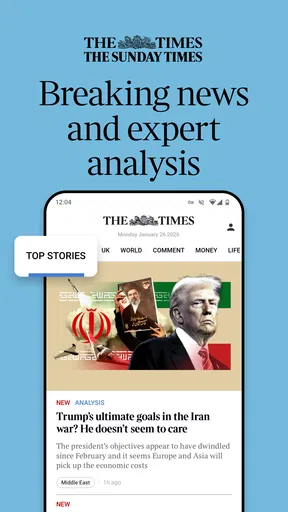
One of the first things that caught my eye was the home page layout. It’s clean, with a neat arrangement of headlines and images that draw you in without overwhelming you. You can easily scroll through the day’s top stories, and if something sparks your interest, just tap to delve deeper into the details.
Customizable Content
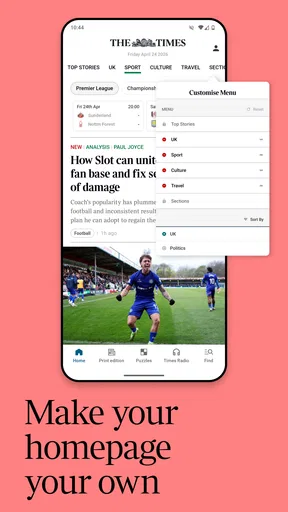
If you’re someone who likes to tailor what you see, this app has got you covered. There’s a nifty feature that lets you customize your news feed. You can choose which sections you want to prioritize, whether it’s politics, business, sports, or entertainment. It’s like having your very own personalized newspaper!
A practical way to use that control is to treat it as an ordering tool, not a filter that hides everything else. I would prioritize the sections I return to often, then still browse beyond them occasionally. That keeps the home page quick to scan without making my news routine so specialized that an important development outside my chosen subjects is easy to miss.
Daily Editions and Breaking News
What’s really cool is the app’s daily editions feature. Every morning, you get a fresh edition loaded with curated content, so you can start your day with a comprehensive view of what’s happening around the globe. Plus, they have a dedicated section for breaking news, which keeps you updated on major events as they unfold.
The two formats serve different purposes: I would use the edition for a planned reading session and the breaking-news section when I want to check whether a developing event has changed. That distinction helps prevent a common news habit from taking over the day—reopening the app every few minutes without gaining much more understanding. For a developing story, I would also read beyond the headline before drawing a conclusion; a fast update is useful for orientation, not always for context.
Multimedia Rich Content
Another aspect that I absolutely love is the multimedia content. The app doesn’t just rely on text; it also includes videos, photo galleries, and even podcasts. It’s a great way to engage with the news if you’re not in the mood for reading long articles. The videos are crisp, and the audio quality of the podcasts is top-notch.
Format choice is a small but useful habit change. I would pick video when a visual explanation adds something, and use a podcast when I can listen without needing to watch a screen. For complicated topics, though, I would return to the written article: audio is convenient, but it can be harder to revisit a specific detail than a paragraph I can scan again. The strongest routine is not consuming every format; it is choosing the one that suits the moment.
Keeping the habit manageable
After the novelty fades, the daily edition is the feature I would judge most carefully. If it reliably gives me a starting point, I can make one short visit in the morning and avoid turning news into an endless scroll. If I find myself opening the app out of reflex, I would set a personal boundary—one planned check for the edition and another only when there is a story I genuinely want to follow. The point is to let the app support a routine, not dictate one.
For a reader deciding whether to keep it installed, the useful question is not whether there is always something to tap. News apps rarely lack headlines. I would ask whether the combination of curated reading, topic priorities, and multimedia gives me enough reason to return on an ordinary day, when nothing especially dramatic is happening. That recurring usefulness matters more than a burst of curiosity during the first few sessions.
My Personal Take
Using The Times: UK & World News has been a refreshing experience. It’s evident that a lot of thought has been put into making this app both informative and user-friendly. The ability to customize my news feed is probably my favorite feature, as it ensures I’m always in the loop on topics I care about.
There are practical details worth weighing before making it a daily destination. The app is free to install, but it includes in-app purchases priced from ninety-nine cents to just under one hundred and forty-five dollars per item, so I would check what an offered purchase covers before confirming anything. Its average rating is 3.6 from around 8,800 ratings, which suggests readers’ experiences are mixed rather than universally glowing. I would treat that as a prompt to try my own routine, not as a substitute for deciding whether its coverage and reading style suit me.
The Times Media Limited app has been around since June 29, 2011, and its current version is 11.21.0. It has more than one million installs, but popularity alone does not tell me whether the editorial mix is right for my needs. The practical test is whether I keep finding worthwhile coverage after the initial exploration, and whether the format makes it easier to understand a story instead of merely giving me another place to skim headlines.
While the app is mostly geared towards UK and world news, it provides a balanced perspective that’s beneficial for anyone interested in global affairs. The content is well-researched, and the journalists behind the stories clearly know their stuff.
When I would look elsewhere
I would skip it if my priority were a single blended feed from many publishers, or if I needed a source centered on neighborhood-level information. A general aggregator can make comparison between outlets quicker, while a local publication is more likely to focus on nearby events. The Times app makes more sense when its particular mix of UK and international reporting is already close to what I want to read.
It also deserves a little editorial caution, as any single-publication news source does. When a consequential story affects a decision I need to make, I would check how other reputable outlets frame it instead of assuming one app is the whole picture. That does not make this app less useful; it makes its role clearer. I would keep it as one dependable part of a broader news diet, not treat it as the only lens on a complex issue.
Why You Might Love It
If you’re someone who values high-quality journalism and enjoys staying informed about significant world events, this app is worth a download. It’s like carrying a comprehensive news library in your pocket, ready to be accessed whenever you have a moment to spare.
Moreover, the multimedia aspects make it a dynamic way to consume news. You can watch a quick video during your coffee break or listen to a podcast on your commute. It’s designed to fit seamlessly into your daily routine.
It is rated for Everyone 10+ and requires Android 9 or later, details that help families and Android users check basic suitability before installing. For someone who prefers iOS, the same decision still comes down to whether the publication’s approach and recurring content match their interests. Either way, I would start with a few deliberate visits rather than expecting the app to transform my news habits overnight.
One small but worthwhile approach is to periodically revisit the sections I have prioritized. Interests shift, and a feed configured around an old routine can quietly become less useful. I would adjust it when I notice I am skipping the same section repeatedly or missing subjects I now care about. That lightweight maintenance keeps personalization helpful without turning setup into a project.
The Final Word
In a world where staying informed is more important than ever, having a reliable and engaging source of news is a must. The Times: UK & World News delivers just that. It’s a well-rounded app that caters to various interests, making it a fantastic choice for anyone looking to stay updated on the latest happenings.
My long-term verdict is that it can earn a place on a phone if I use its edition as a regular anchor and value its mix of written and multimedia coverage. The maintenance burden is modest: keep topic priorities relevant and resist the urge to check every alert or headline simply because it is there. Its lasting value depends on whether that curated experience continues to offer enough context and variety for my day.
So, if you’re on the hunt for a new way to consume your daily dose of news, give this app a shot. It’s likely to become your go-to source for all things news-related. Happy reading!
Pros
- Comprehensive news coverage worldwide.
- User-friendly interface with easy navigation.
- Regular updates keep content fresh.
- Customizable notifications for breaking news.
- Offline reading mode available.
Cons
- Premium content requires subscription.
- Occasional ads in the free version.
- Some users report app crashes.
- Limited multimedia content in articles.
- Requires internet for live updates.
FAQs for The Times: UK & World News
Is The Times: UK & World News app free to use?
The Times: UK & World News app offers a mixture of free and premium content. While you can access some articles and features for free, full access to all content typically requires a subscription. The app may offer a trial period for new users to explore premium features before committing to a subscription.
What platforms is The Times: UK & World News app available on?
The app is available for both Android and iOS devices. You can download it from the Google Play Store for Android or the Apple App Store for iOS. Ensure your device meets the minimum system requirements for a smooth experience. Regular updates are released to enhance functionality and security.
Can I personalize the news feed in The Times app?
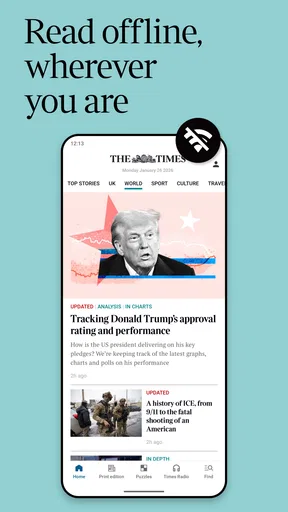
Yes, The Times app allows users to personalize their news feed. You can select topics of interest, such as politics, sports, or entertainment, to see more relevant content. The app also lets you save articles for offline reading, making it easier to stay informed on the go.
Does The Times app offer breaking news alerts?
The app provides breaking news alerts to keep you updated with the latest developments. You can customize notifications to receive alerts for specific categories or major news events. This feature ensures that you don't miss out on important stories as they happen around the world.
How can I manage my subscription to The Times app?
Subscriptions can be managed directly through the app or the platform’s app store. You can view your subscription details, change your plan, or cancel it if necessary. The Times app provides customer support to assist with any subscription-related queries, ensuring a straightforward user experience.


